JAMB Slip Reprint 2026/2027: How to Print Your UTME Examination Slip Online – The Joint Admissions and Matriculation Board (JAMB) has officially activated the 2026 UTME slip reprint portal, and all candidates are now required to reprint their exam slips.
This examination slip is your “entry pass” to the CBT centre; it shows your exact exam date, time, and venue, and you will not be allowed to write the exam without it.

If you registered for JAMB 2026/2027, this guide will show you the correct reprint website, how to reprint your slip with your phone or computer, and what to do after the exam to check your result.
Our website is committed to giving you accurate and legit JAMB updates, so you don’t fall for fake links or wrong information.
Official JAMB Slip Reprint Portal 2026/2027
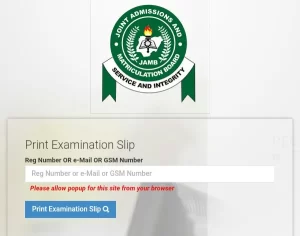
JAMB has a dedicated portal for printing and reprinting UTME examination slips. For the 2026 UTME, candidates should use the official slip printing link below:
JAMB Exam Slip Reprint URL:
https://slipsprinting.jamb.gov.ng/PrintExaminationSlip
You may also see JAMB and major news outlets share this same link or variations that redirect to it, but it must always be on the jamb.gov.ng domain.
Important points:
-
You do not need a scratch card or PIN to reprint your exam slip.
-
You only need your JAMB Registration Number, or the email address/phone number used for registration.
If any café or website asks you to pay for a “reprint PIN”, walk away—slip re-printing itself is free on the JAMB portal.
When Does JAMB Slip Reprinting Start?
JAMB usually opens the reprint portal about one week before the main UTME starts. For 2026:
-
JAMB has announced that exam slip reprinting begins on 9 April 2026.
-
The main UTME is scheduled to start shortly after, so candidates have just a few days to reprint before their exam date.
Do not wait until the night before your exam. Reprint the slip as soon as the portal is activated so you can plan your trip to the centre.
How to Reprint JAMB Exam Slip 2026/2027 on a Computer
You can reprint your JAMB slip yourself using a laptop/desktop, or do it at any cyber café.
Follow these steps:
-
Open your browser
-
Use Chrome, Firefox, Edge, or any modern browser.
-
-
Visit the official slip printing page
-
Type or click:
https://slipsprinting.jamb.gov.ng/PrintExaminationSlip
-
-
Enter your details
-
In the space provided, type one of the following:
-
Your JAMB Registration Number, or
-
The email address you used during registration, or
-
The phone number you used when you created your JAMB profile.
-
-
-
Click “Print Examination Slip”
-
Click the button and allow pop‑ups in your browser if prompted; the slip opens in a new window or tab.
-
-
View your exam details
-
Your slip will show:
-
Exam date
-
Exam time
-
Exam venue and full address
-
Your name, passport photo, and UTME subjects.
-
-
-
Print or save the slip
-
Click Print to print a hard copy immediately.
-
You can also choose “Save as PDF” and print later at a café or business centre.
-
Most candidates print at least two copies—one to carry to the centre and one as backup.
How to Reprint JAMB Slip on Phone (Mobile Method)
You can also reprint your slip using just a smartphone and print it later.
-
Open Google Chrome (recommended) on your phone.
-
Go to:
https://slipsprinting.jamb.gov.ng/PrintExaminationSlip. -
Tap the three dots in Chrome and tick “Desktop site” so the page displays like on a computer.
-
Enter your registration number, email, or phone number.
-
Tap “Print Examination Slip” and allow pop‑ups.
-
When the slip appears, tap the share or menu icon and:
-
Download the slip as a PDF, or
-
Send it directly to a printer if connected.
-

Later, you can take the PDF to any café or print shop for printing.
What You Must Check on Your Exam Slip
Once your JAMB exam slip loads, carefully confirm these details:
-
Your full name (correct spelling)
-
Your passport photograph
-
Your UTME subject combination
-
The exact date of your exam
-
The time/session (morning, afternoon, or evening)
-
The exam centre name and full address
If you notice a serious issue—for example, a centre in another state you never selected, or the wrong subject combination, report immediately to JAMB via an accredited CBT centre or official helpdesk for guidance.
Frequently Asked Questions (FAQ)
1. What do I need to reprint my JAMB slip?
You only need one of these:
-
JAMB Registration Number, or
-
Email address used for JAMB registration, or
-
Phone number linked to your JAMB profile
No scratch card or PIN is required.
2. Is JAMB slip reprint free?
Yes. JAMB does not charge for exam slip reprinting on its portal. You might only pay a small printing fee at a cyber café or business centre.
3. Can I reprint my slip more than once?
Yes, you can reprint multiple times. It is advisable to:
-
Print at least two copies.
-
Keep one safely and take one to the exam centre.
4. How do I check my JAMB result after the exam?
After the exam, you can check your UTME result either online or via SMS.
Online method:
-
Visit the JAMB result page or log in to https://portal.jamb.gov.ng/efacility.
-
Enter your registration number (and other details if required).
-
Click “Check UTME Result” to view your score and subject breakdown.
Or use your own detailed guide:
For a step‑by‑step tutorial, see: https://recruitngr.com/jamb-result-checker/.
SMS method (when enabled):
-
Using the same phone number you used for registration, open your Messages app.
-
Type
UTME RESULTorRESULTJAMB will confirm the correct keyword. -
Send it to 55019 or 66019.
-
You’ll get an SMS with your UTME score (service charge usually ₦50).
5. What happens if I don’t reprint my JAMB slip?
If you don’t reprint your JAMB slip:
-
You may not know your exact exam date and time, and you could miss your exam.
-
You might go to the wrong centre or wrong day, and JAMB will not schedule a special exam for you.
Reprinting is compulsory for all candidates.
Final Tips for JAMB 2026/2027 Candidates
-
Reprint your exam slip as soon as the reprint portal opens; don’t wait till the last minute.
-
Visit your centre before the exam day if you are not familiar with the area.
-
On the exam day, arrive at least 1–2 hours early with:
-
Your printed exam slip
-
A simple biro/pen (if allowed)
-
Any additional items JAMB officially permits
-

🔗 WAEC Updates 2026 — Results, Timetable & Registration
🔗 NECO Updates 2026 — Timetable & Results
🔗 NYSC Portal 2026 — Registration & Login
🔗 Browse All Education Updates
Disclaimer
Recruitngr provides verified recruitment information to millions of Nigerians. This page is independently researched, not affiliated with any government agency. Apply only via the official portal above. On the other hand, we will not ask for money for any information we provide here.